You enter the meeting room for your weekly working group. As a good staff officer, you are five minutes early so you can set up. You are in before the meeting boss (good start) and you know what the meeting is about, but as you sit down the familiarity of the room reminds you that you had a task from last week’s meeting and you are expected to give an update. Hopefully, you can wing it. Walking in right behind you is another staff officer. For some reason they always seem to have it all together – they open their folder and you can see the notes they have prepared for the meeting, plus they have their own copy of the agenda. They even managed to get a coffee before they came in. Just as the meeting boss is about to enter the ‘other staff officer’ flies in. Luckily a pen is present, but this is not always the case, and there is no notebook. When asked for an update, a blank and slightly surprised look crosses the face followed by a mumbled ‘it’s on track Boss, I’ll provide a full report next week’, but you know there is nothing behind the promise (and so does the Boss).
Which one of these staff officers are you now, and which one do you want to be? Most people sit in the middle and can’t work out how to be that organised. When things get busy, they often slip to be the ‘other staff officer’, bouncing from meeting to meeting and never getting ahead of the power curve.
In this article I will cover activities and approaches to transform staff officers from mediocre to organised, even when things get busy. I use these approaches to coordinate all my time, because time with my family is more precious than work time, and when you have a busy life it is important to get the most out of all of it. I find that by managing my time better I have more of it because I don’t waste it. Treat your life like a campaign and things will work together not against each other.
The Calendar
Regardless of what type of calendar you use, using one is essential. It could be electronic or paper-based, broad or detailed, the key is to have one. Different types have different benefits – electronic calendars can be updated, shared, and synchronised to have with you wherever you go. Paper-based can be taken into secure facilities that don’t allow electronic devices.
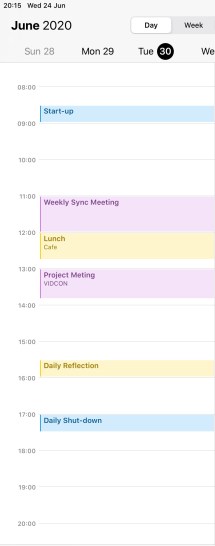
I like to use my phone calendar, which synchronises across all my devices and is always in my pocket. Even though my work system is different from my phone, I will either copy or invite myself so that the information is all in one place. That way I can deconflict the various meetings, appointments, and events and make sure I don’t miss things. I also put nearly everything into my calendar, which drives my wife crazy.
When I am working predominately in a place where I can’t have my phone I will use the work calendar and take a daily printout (treat myself like the principal) so I can make notes, pen-amend during the day as things change, but most importantly have a copy with me. If I am using the paper version then when time permits I will transfer the updated information into my electronic calendar.
Plan Your Time
Within my calendar, I set aside time to plan my day. Firstly I put in all the pre-determined meetings. Then I have certain times in my calendar that support my time management. At the start of each day, I put the time in my calendar for my start-up routine, and similarly at the end of the day I have a shutdown routine. The start-up routine serves to get things ready for the upcoming day. I use this time to:
- Log in to the system
- Check the calendar and mentally note everything is there – additional meetings or appointments which have come in
- Review and reprioritise tasks due to time constraints
- Check emails which have come in since logging off the previous day
- Review the daily news summary
At the end of the day I’ll do the following:
- Update my task tracker and close out any tasks which have been completed
- ‘Check-in’ any documents I have on my workspace, make sure they have updated
- Review the calendar and add any amendments from my printout version or notes I have taken from the day
- Look at the following day’s calendar for any things that are going to trip me up first thing – early meetings, things I need to prepare for, location changes, etc.
- Log off from the system and secure documents
By bookending my day like this I know where I need to focus my time and ensure I am prepared for my meetings and discussions.
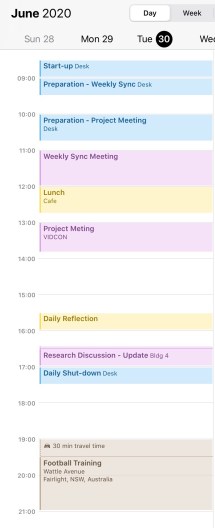
Part of the benefit of managing your time is being able to control what you do during it, and allocating time for the tasks and projects. Prior to any meeting or brief, it pays to prepare, and therefore put that preparation time into the calendar. By blocking out the time (and you will know how much time it takes to prepare) you will set yourself up to be ready for the meeting. I don’t recommend leaving preparation until just before because that gives you no flexibility if something changes.
One thing that many people don’t include is travel time. If you work in an office where things are spread out, or you have meetings in different locations, the travel time can be just as important to understand otherwise you are likely to be late. I find this is a significant factor for family activities, such as getting to appointments and training where being on time is not just important to you, but also to whoever you are meeting. By blocking out realistic travel time you will be better prepared, physically, and mentally.
Regularly reviewing your calendar is important to make sure changes are incorporated. The review rate (how often) will depend on how dynamic your environment has to be. I review the calendar at least morning and afternoon to adjust for changes, and whenever I update things, particularly if a new meeting comes in and I identify conflicts that require reprioritisation of the other tasks. I allocate time in my calendar to do the tasks in my task list – treat each one like a minor project (plan to plan) so I can focus on those that are of the highest priority at the time. Allocate time to check and respond to emails, otherwise there is a tendency to constantly check them and be a slave to the inbox.
When developing and managing a calendar you will need to define how rigid or flexible you want it to be – and the answer lies somewhere in the middle. Planning time down to the half-hour is time-consuming and means that if you have a slight change then it all gets thrown into disarray easily, yet having big blocks doesn’t provide enough structure and will often lead to procrastination. I find that being specific with the pre-planned meetings is good because it also holds me to a set time (I know how much time I have so I don’t waffle) and then the time around them is allocated to tasks, emails, and other things. The more structure the more focused you will be and the more prepared for meetings and tasks you will be.
Colours
Colours in a calendar allow you to differentiate between activities, as well as making them easier to see. If they are all the same colour then they all blend into one when you glance at them. If you use different colours for different types of tasks and events you will get a better picture of where you spend most of your time – the colours provide a visual cue.
Each colour should have a particular meaning – what those meanings are will depend on your own needs. I use the one calendar for all things so I can organise my life, so I have a few broad colours I use: Red is important and requires preparation because I am lead; Yellow is personal time; Blue is administration; Brown is sport; Purple is project; Green is family.
The key thing here is consistency – I use the same colours for my calendar as I do for my task list, so that way if I see a red entry, I know I need to prepare for it. The calendar is a tool to assist you to be more organised – set it up to support you.
Alarms
Nothing is worse than getting in to the groove of your task, forgetting the time and being late to the next appointment. Alarms provide a prompt that something else is coming up, which then allows for you to decide on the relevant importance of the next activity. If you are in an essential meeting or phone call, you can use the prompt to send a message to your next meeting that there will be a delay. Alarms can also be an excuse to wrap things up. Importantly with alarms, they are set when you are planning out the day or adding the event to the calendar so you can be conservative with the time – include travel time and ensure you have everything you need so you can walk in, sit down and contribute effectively.
Relax and Reset
Finally, plan in time to rest and reset. Whether that is periods throughout the day to step away from the computer and have lunch or a snack, or reflection time to gather your thoughts, the time is not wasted. Often a seemingly insurmountable problem takes on a different perspective when you step away from it for a moment – the brain can do some pretty amazing things when you let it.
Conclusion
Time management puts structure around what can be a chaotic and busy life. It allows you to focus on the things which are important and be prepared for the meetings and activities. I recommend including both work and personal time in your schedule so you make the most of it, particularly as your time becomes taken up with more activities as you get busier. Learn to manage your time when it is quiet and you will set yourself up for success when you get busy.
Time is the only resource you can’t get back once it is gone.


Tricks explained well about time management
LikeLike