Featured

The Staff Officer Program – An Overview

What’s this?

This group of articles is the distillation of the things I have learned over my career, which so far has spanned 30 years. I have been very fortunate with the experiences I have had and the people with whom I’ve worked. I have tried to take a lesson away from each interaction – lessons about things that work and things that don’t. Sometimes the lesson aren’t immediately apparent, and sometimes they are right there so you can’t ignore them.

As this is this distillation of my experience, I intend to cover what I consider to be the complete package. Not sure if I will include anecdotes about situations when I have seen these things play out or when I learnt the lesson of what not to do, time will tell.

To Whom is the Program Aimed?

Ideally I’d aim this at the junior leader and manager. I’ve spent a long time in the military, but I would say that the lessons and ideas put forward here are likely to be useful in business and life – because life is just one long string of problems (or opportunities, depending on how you look at them), at the very least we travel along a path and have to make decisions – the better prepared to make those decisions, the better off we will be.

What’s In It?

I have broken the topics into small chunks – easily digestable and able to be referenced at a later time. Depending on my proficiency with WordPress, I will endeavour to include diagrams to support the information and ideas. The program will look something like this:

Potentially eight weeks, could be as long as eight months. It will be interesting to see how far I can push this, linking it into Twitter so the releases will be broadcast.

Making Meetings Better

Meetings form the cornerstone of how teams work. They can be one-on-one or the entire group. In our current situation of limited time (and that was before COVID-19), meetings and the time we dedicate to them can be a significant drag on our productivity. Many people come away from their meetings with the ‘well that’s 2 hours of my life I’ll never get back’ feeling. So how do we make meetings better and a good use of time? I put this in 2 categories – preparation and conduct.

Preparation

When preparing for a meeting, the effort put in will show benefits at the output. This includes preparation by the organiser as well as the attendees. Pre-reading and an agenda will mean people come prepared and ready to discuss what needs to be discussed. Also having an outcome in mind (we will decide this or we will cover that) means everyone will stay on track. The use of videoconferencing platforms like Zoom now tend to constrain the time of the meeting – which is a good thing if that time is planned, not so much if the meeting is allowed to meander. Preparation doesn’t stop at the start of the meeting – capturing key information, decisions and follow-up actions are all part of making sure the meeting has a purpose.

Conduct

During the meeting itself, better outcomes are achieved when everyone contributes appropriately. I say appropriately because it isn’t just equally – some people have more to say, others have less to contribute but need to walk away understanding what their tasks are. This reinforces the need to have a guided meeting so that everyone has the opportunity to contribute, not just the loudest. This can be achieved using questions like ‘what are your takeaway tasks’ or ‘does this agree with your perspective’? Without the contribution from everyone, it might as well be a lecture.

These are just a couple of my thoughts about getting the best out of meetings – run poorly they waste a lot of time, organised and conducted well they are focused and beneficial for the attendees.

#MakeMeetingsWork

Task Prioritisation

In a busy life we get tasks which have to be done. Successfully prioritising these tasks will free up time and mean the right tasks are completed first, leaving other tasks for later. Many approaches to prioritising tasks have been developed over time. The level of sophistication of how to prioritise your tasks will depend on a number of factors, including how many tasks you get, how many different sources they come from and how much autonomy you have to set your own schedule. The approach you take to prioritising your tasks will depend on your needs – a simple list of tasks based on ‘first in – first out’ may work, or prioritised by deadline (‘closest crocodile to the boat’ approach) means you will get the tasks done on time, but you will also be reactive and not able to smooth out the intensity of your work. The challenge with any approach is to balance effectiveness (clear prioritisation to do the most important things first) and simplicity so that you use the process. Then there are the plethora of tools which support tracking the tasks.

I have found that the most effective task prioritisation tool is one that takes into consideration both importance and the timeframe in which something is due.

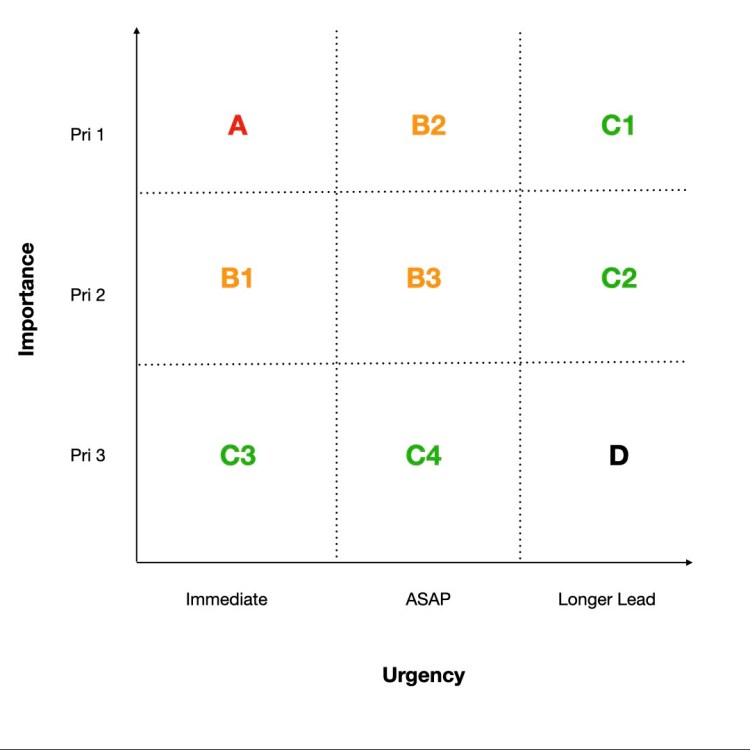
This was addressed by Eisenhower in the Eisenhower Urgent/Important Principle, which uses a combination of importance and urgency to prioritise tasks. This is a simple 2 x 2 matrix where tasks are rated as to their importance as well as their urgency to prioritise them. The Eisenhower Urgent/Important Principle is very effective and useful, however I personally found it a bit limiting. The approach I use is a 3 x 3 matrix which is an adaptation of Eisenhower’s matrix. This adjustment provides more flexibility and takes into consideration that urgency has an element of importance to it. Critical to applying this matrix is an element of assessment, and the more objective the better. Also, don’t think of the allocation as static (ie. once allocated a prioritisation it stays as that), because as the deadline gets closer, the prioritisation will change. This approach means regular review of the task list is needed to ensure it remains relevant.

Priority Matrix

This is how I define importance and urgency:

  • Importance: How important is the completion of this task? This may be defined by an external agency (the tasker), so I use the following:
    • Priority 1 – Directed task with a ‘no fail’ criteria and high consequences if not completed.
    • Priority 2
      • Requested by a higher authority, or
      • an internally identified task, or
      • an interim or enabling element to a larger task.
    • Priority 3 – ‘Nice to Do’ or of low consequence
  • Urgency: How quickly does the task need to be completed? This is usually part of the task. The urgency differentiator is dependant on the responsiveness you need to meet. For me, my tasks usually work in the weeks timeframe.
    • Immediate – for me, anything due in the next 2 business days is considered ‘immediate’.
    • ASAP – within the next 2 weeks constitutes ‘as soon as possible’.
    • Longer lead – for those tasks which are due for a while, however when you invest in these tasks the outcomes are more beneficial.

By allocating the A through D priority to each task you will be able to quickly see which tasks should have your attention. Similarly, a less-important task due in 2 days should be done before the no-fail task due in the next 2 weeks.

This approach also fits nicely with most task tracking applications, be it the native task tracker included in Microsoft Outlook or the bespoke tracker, or even the hand-written To Do list in the diary. Most electronic task trackers have 3 priority levels, which neatly fit with this approach: A – High; B – Normal; and C/D – Low. Labelling becomes important when you filter/order the tasks, because if you filter alphabetically and label the task with the priority at the beginning then the B1 tasks will appear before B2 etc.

It is essential to review the list regularly and update the priority as the deadline approaches. As you can see from the matrix, once the ‘Urgency’ column changes the priority jumps markedly. Part of my daily routine, at the start and end of each day is to review my task list and update the priority if the due date now falls within a shorter timeframe.

This is what it looks like in practice:

  1. An important task to complete a report comes in to your in tray on Monday, due the following Friday. It is ‘no fail’ from the Boss, so it gets a priority of ‘B2‘ and is put into the task list.
  2. Another important task comes in on Monday afternoon to prepare the directorate budget for next year. It isn’t due for a month, so it gets a priority of ‘C1‘ and is put into the task list. You put time in the calendar  for Tuesday afternoon to plan this task.
  3. During your planning session on Tuesday afternoon you identify a number of sub-tasks to the budget task. One of these tasks is to send out a request to section heads for their budget submissions, which needs to go out by Monday next week. As a sub-task which is due within the next 2 weeks, it gets a priority of ‘B3‘ for the task list.
  4. Thursday afternoon, as you review the Task List, the B3 task due next Monday is now due in 2 business days. It is re-allocated as ‘B1‘ and goes to the top of the list.
  5. On Wednesday of the second week, when you review the tasks, the ‘B2’ task due Friday is now due in 2 days so is re-allocated as ‘A‘.

The key things with this approach to task prioritisation are that you apply an objective set of rules to what you are doing to identify what to spend your time on. It takes into consideration the importance of deadline proximity and is dynamic, but does require you to invest regular time to keep the list accurate.

Time Management

You enter the meeting room for your weekly working group. As a good staff officer, you are five minutes early so you can set up. You are in before the meeting boss (good start) and you know what the meeting is about, but as you sit down the familiarity of the room reminds you that you had a task from last week’s meeting and you are expected to give an update. Hopefully, you can wing it. Walking in right behind you is another staff officer. For some reason they always seem to have it all together – they open their folder and you can see the notes they have prepared for the meeting, plus they have their own copy of the agenda. They even managed to get a coffee before they came in. Just as the meeting boss is about to enter the ‘other staff officer’ flies in. Luckily a pen is present, but this is not always the case, and there is no notebook. When asked for an update, a blank and slightly surprised look crosses the face followed by a mumbled ‘it’s on track Boss, I’ll provide a full report next week’, but you know there is nothing behind the promise (and so does the Boss).

Which one of these staff officers are you now, and which one do you want to be? Most people sit in the middle and can’t work out how to be that organised. When things get busy, they often slip to be the ‘other staff officer’, bouncing from meeting to meeting and never getting ahead of the power curve.

In this article I will cover activities and approaches to transform staff officers from mediocre to organised, even when things get busy. I use these approaches to coordinate all my time, because time with my family is more precious than work time, and when you have a busy life it is important to get the most out of all of it. I find that by managing my time better I have more of it because I don’t waste it. Treat your life like a campaign and things will work together not against each other.

The Calendar

Regardless of what type of calendar you use, using one is essential. It could be electronic or paper-based, broad or detailed, the key is to have one. Different types have different benefits – electronic calendars can be updated, shared, and synchronised to have with you wherever you go. Paper-based can be taken into secure facilities that don’t allow electronic devices.

img_0089

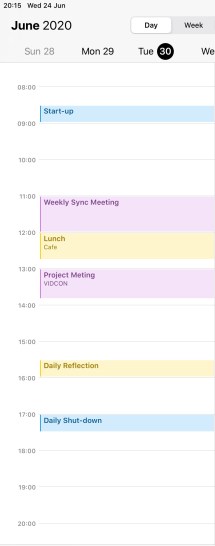
I like to use my phone calendar, which synchronises across all my devices and is always in my pocket. Even though my work system is different from my phone, I will either copy or invite myself so that the information is all in one place. That way I can deconflict the various meetings, appointments, and events and make sure I don’t miss things. I also put nearly everything into my calendar, which drives my wife crazy.

When I am working predominately in a place where I can’t have my phone I will use the work calendar and take a daily printout (treat myself like the principal) so I can make notes, pen-amend during the day as things change, but most importantly have a copy with me. If I am using the paper version then when time permits I will transfer the updated information into my electronic calendar.

Plan Your Time

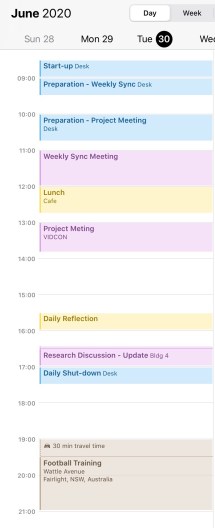
Within my calendar, I set aside time to plan my day. Firstly I put in all the pre-determined meetings. Then I have certain times in my calendar that support my time management. At the start of each day, I put the time in my calendar for my start-up routine, and similarly at the end of the day I have a shutdown routine. The start-up routine serves to get things ready for the upcoming day. I use this time to:

  • Log in to the system
  • Check the calendar and mentally note everything is there – additional meetings or appointments which have come in
  • Review and reprioritise tasks due to time constraints
  • Check emails which have come in since logging off the previous day
  • Review the daily news summary

At the end of the day I’ll do the following:

  • Update my task tracker and close out any tasks which have been completed
  • ‘Check-in’ any documents I have on my workspace, make sure they have updated
  • Review the calendar and add any amendments from my printout version or notes I have taken from the day
  • Look at the following day’s calendar for any things that are going to trip me up first thing – early meetings, things I need to prepare for, location changes, etc.
  • Log off from the system and secure documents

By bookending my day like this I know where I need to focus my time and ensure I am prepared for my meetings and discussions.

Part of the benefit of managing your time is being able to control what you do during it, and allocating time for the tasks and projects. Prior to any meeting or brief, it pays to prepare, and therefore put that preparation time into the calendar. By blocking out the time (and you will know how much time it takes to prepare) you will set yourself up to be ready for the meeting. I don’t recommend leaving preparation until just before because that gives you no flexibility if something changes.

One thing that many people don’t include is travel time. If you work in an office where things are spread out, or you have meetings in different locations, the travel time can be just as important to understand otherwise you are likely to be late. I find this is a significant factor for family activities, such as getting to appointments and training where being on time is not just important to you, but also to whoever you are meeting. By blocking out realistic travel time you will be better prepared, physically, and mentally.

Regularly reviewing your calendar is important to make sure changes are incorporated. The review rate (how often) will depend on how dynamic your environment has to be. I review the calendar at least morning and afternoon to adjust for changes, and whenever I update things, particularly if a new meeting comes in and I identify conflicts that require reprioritisation of the other tasks. I allocate time in my calendar to do the tasks in my task list – treat each one like a minor project (plan to plan) so I can focus on those that are of the highest priority at the time. Allocate time to check and respond to emails, otherwise there is a tendency to constantly check them and be a slave to the inbox.

When developing and managing a calendar you will need to define how rigid or flexible you want it to be – and the answer lies somewhere in the middle. Planning time down to the half-hour is time-consuming and means that if you have a slight change then it all gets thrown into disarray easily, yet having big blocks doesn’t provide enough structure and will often lead to procrastination. I find that being specific with the pre-planned meetings is good because it also holds me to a set time (I know how much time I have so I don’t waffle) and then the time around them is allocated to tasks, emails, and other things. The more structure the more focused you will be and the more prepared for meetings and tasks you will be.

Colours

Colours in a calendar allow you to differentiate between activities, as well as making them easier to see. If they are all the same colour then they all blend into one when you glance at them. If you use different colours for different types of tasks and events you will get a better picture of where you spend most of your time – the colours provide a visual cue.

Each colour should have a particular meaning – what those meanings are will depend on your own needs. I use the one calendar for all things so I can organise my life, so I have a few broad colours I use: Red is important and requires preparation because I am lead; Yellow is personal time; Blue is administration; Brown is sport; Purple is project; Green is family.

The key thing here is consistency – I use the same colours for my calendar as I do for my task list, so that way if I see a red entry, I know I need to prepare for it. The calendar is a tool to assist you to be more organised – set it up to support you.

Alarms

Nothing is worse than getting in to the groove of your task, forgetting the time and being late to the next appointment. Alarms provide a prompt that something else is coming up, which then allows for you to decide on the relevant importance of the next activity. If you are in an essential meeting or phone call, you can use the prompt to send a message to your next meeting that there will be a delay. Alarms can also be an excuse to wrap things up. Importantly with alarms, they are set when you are planning out the day or adding the event to the calendar so you can be conservative with the time – include travel time and ensure you have everything you need so you can walk in, sit down and contribute effectively.

Relax and Reset

Finally, plan in time to rest and reset. Whether that is periods throughout the day to step away from the computer and have lunch or a snack, or reflection time to gather your thoughts, the time is not wasted. Often a seemingly insurmountable problem takes on a different perspective when you step away from it for a moment – the brain can do some pretty amazing things when you let it.

Conclusion

Time management puts structure around what can be a chaotic and busy life. It allows you to focus on the things which are important and be prepared for the meetings and activities. I recommend including both work and personal time in your schedule so you make the most of it, particularly as your time becomes taken up with more activities as you get busier. Learn to manage your time when it is quiet and you will set yourself up for success when you get busy.

Time is the only resource you can’t get back once it is gone.

Plan to Plan

When most people start a task they jump straight in and commence the task. This gets the ball rolling and they start their research or even commence developing the product – especially if they have a template to use or something someone else has used previously which was successful. However, the downside of this is that they waste time doing the wrong things (or just spend too much time doing the preliminary setup and leave themselves short of time to do the important things – like finishing the product).
If you have done any project management then this concept won’t be new to you – plan to plan. That is, whenever you get a new task, plan to have a period when you will sit down and plan out the task. During this planning, you will need to undertake a bit of analysis about what the task is and the essential steps to get to the outcome. In this blog I’ll discuss three parts to this: allocating time to planning, setting objectives, and understanding the environment.

Allocate Time

When the task is first issued, set aside time to develop the plan. This could be immediately, or it could be later if there is a team involved and they need to be gathered. It will also give you time to prepare for the planning meeting by gathering important information. The important information includes:

  • scope of the task – what are you required to look at
  • considerations – are there any things which need to be taken into account
  • timeframes – when is the task due and are there any milestones to be met (or do you have to develop these yourself – hint)
  • assets and resources at your disposal
  • the output from the task – what is your boss asking you for?

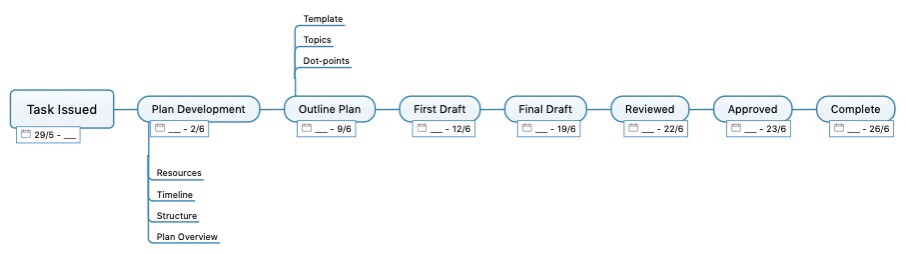
This should all be worked through and captured in a single document which you can refer to regularly to make sure you are on track to meet your deadline. At the very least a timeline is needed so that you know when certain milestones are due.

Set Objectives

Objectives are the aim points along the plan toward which you are working to achieve the endstate – the finished product. In the above example timeline, some of the points are objectives, some are steps to achieve the objective. For example, a First Draft can be either an objective or a step toward the Final Draft. The complexity of the task will guide how many objectives there are in the plan. In a complex task, some objectives may not be along the same line but could come off as a branch line. However, all objectives should lead to the endstate. If an objective is off the main line as a branch, then there is a decision point where the branch occurs – it is a conscious decision to change to the branch.
Objectives, as steps toward the endstate, can be minor plans in their own right with certain elements to be achieved, or at least indicators so that you know when they have been achieved. Sometimes, objectives can be time-based or defined as part of the task (such as draft due for review or the availability of someone critical in the process), other times they are purely self-defined.
Setting objectives is an important step in the plan as they show you whether you are on track to achieve the task on time whilst giving it the proper attention it requires. The objectives allow you to maintain momentum with the task, which becomes more important when working as part of a team that relies on the work of others (including review) to develop the final product.

Understand the Environment

Understanding the environment means being aware of the surrounding influences which could have an impact your plan. This can be as detailed or as brief as you need it to be, but it should be relevant. Also, the environment in which you are planning for this task is going to be similar to the environment in which you are tackling other tasks (unless you are working for different groups with their own individual environment). Why this is beneficial is because if you define the environment that information can be used for multiple tasks – with a bit of tweaking and also regular review.

Things to consider when assessing your environment include:

  • who you are with, how do they function best so you utilise their strengths
  • what type of organisation are you working for, how rigid is it and how do they like things done
  • what events are coming up on the calendar which may impact the task, including availability of key resources
  • what are the risks to completing the task
  • what facilities and infrastructure do you have access to, and will that support your work
  • what IT do you have available to you and how competent are those you are working with at using it (not everyone needs to be IT-brilliant, but understanding how different your skills are to theirs is important).

What is the Output – the Task Plan

At the completion of the planning process you will need to capture the information in what should be described as a task plan. The task plan serves a few purposes, but three of them are more important than the rest:

  • an outline to follow – what to do when
  • a way to read back to the task initiator (your boss) what you are going to do

As a record for you to follow you will be able to check your progress and understand the impact or implications of any changes to the environment. You can compare it against your other task plans to identify any periods when your resources will be overwhelmed (including your own time). I will go into tracking your progress in more detail in a later article, but needless to say knowing if you are off track to meeting your key objectives early so you can divert resources is critical to meeting your task deadline (Hint: green is good, red is important).

After you have done your planning it is advantageous to brief back to the task initiator what you are going to do. This will confirm that you have understood the task and have taken into consideration any key factors and associated risks. This may also stimulate further guidance or questions which will ultimately inform a better product at the completion of the task.

Conclusion

What has been provided here are some ideas about planning a task. The time invested in undertaking the plan will pay dividends in structuring your task and allocating your resources to achieve the task on time and to the standard required.

Undertaking planning is important, but a waste if you don’t revisit the plan and update it regularly as you progress. Revisiting when there is a change in the environment will highlight risks and friction points, especially if you review it alongside your other tasks. Early intervention and adjustment will save a lot of rushing at the end and reduce your stress levels.

The Fundamentals

What are the Fundamentals?

The fundamentals are those aspects or behaviours which underpin everything you do. They are not a list of ‘what’ to do, more the ‘how’ or ‘why’ which you should take into consideration. Think of them as the framework. What I have listed here are some things to think about and in some respects the way I address things – but that is my particular style.

Be the Principal

When you work with or for senior officers or senior staff within an organisation, you will note that they are usually very busy, moving from meeting to meeting, approving proposals within their authority, and sometimes providing advice to the Boss from their area. When you think of a principal, think of a position which has staff attached to it – someone junior who organises their diary, coordinates the things they have to read or sign and basically makes sure they are at the right place at the right time with the right information to do what they need to do.

One of the keys to being a good staff officer is to treat yourself like the principal – have your calendar marked out, plan time to prepare for meetings by doing the work beforehand, obtain the background reading before you walk into a meeting. The only difference is, the person doing that for you is you. It will take time so will need to be planned for – but it will also save time as you become more efficient.

The best way to learn is to do – become the personal staff officer for a Principal in your organisation. Next best is to learn from them, and their staff officer – organise a time to talk through how they approach things and what does or doesn’t work for them.

Treat Your Life Like a Campaign

I’m not talking about an election campaign, I’m referring to a military campaign. What I mean by this is plan out the things you do and understand how they work towards your objective. A military campaign has different lines of effort, and your life does too – personal, family, work, social – they all compete for your time and focus, and they all have a priority attached to them at a particular time (and that priority can change depending what phase you are in. The campaign can be as all encompassing or discrete as you want (although minor campaigns tend to be more of an operation).

By putting some structure to your life and understanding the resources you require to achieve the objective then you will be better prepared. It is also important to not lose sight of the objective (the goal to which you are working towards) as this will assist you in making decisions

Be Human

There seems to be a misconception that as people become more senior and successful that they become hyper-efficient and machine-like. It is important, in my view, to be a person which means having emotions and engaging with people on a personal level. People might engage with you if they know you can do the job, but the people who work with you will be more engaged if you connect with them. I don’t recommend being fake or disingenuous because people will see straight through you. Being human is about being true to yourself and not being someone you aren’t.

Personal Battle Rhythm

I set up a personal battle rhythm to allocate appropriate time to the things I need to do. A battle rhythm is the program of meetings and events that occur regularly to make a Headquarters run efficiently. Ideally (and I say ideally because it rarely happens), each event has a purpose and the outcomes feed into something else. As a staff officer the workday will be dictated to you by the organisation’s battle rhythm – you will have regular meetings to synchronise, develop or approve different things. What you can affect is the space between and around those meetings to organise your own time. And the battle rhythm doesn’t need to just be about work, although unless your spouse is also in the military, probably best not to refer to it as your personal battle rhythm at home.

Some of the things I include in my personal battle rhythm (which I adjust around the work battle rhythm) are my daily start-up and shut-down routines, time set aside for preparation and post-meeting review, reflection time (I’m not a smoker so I set aside time for myself to get out of the office and take a mental break) and team synchronisation. It is important to remember that all the battle rhythm events should feed another higher-level event or make progress toward your objective – so personal reflection time certainly sits on your ‘Personal’ line of effort.

By having your personal battle rhythm mapped out you should find you allocate time to the important things and become more efficient and productive. The time at the beginning of the day to start-up sets me up for the day, whilst the shut-down time makes sure I close things out and prepares me for the following day. I’ll go into more detail when I cover time management.

Invest

Invest in yourself – you are worth it. That and you won’t get the most out of yourself and your work if you don’t invest in the right tools as they will make your life easier, give you more time and you will be more efficient. Investment is in three key areas (there are more, but these are the most important): tools to be better at what you are trying to do; education so you do what you are doing better; and your mental health

Tools. The tools you use can make the difference between getting a good job done (just) and getting a great job done in the time you have. Tools can vary from the everyday to the specialist tools for a particular project. Before you get the tool you need, you should work out what will work best for you. What type of computer do you need, what operating system works for you and what programs do you need to support you. I spend my money on a couple of things because they work for me – all my technology is built around the same ecosystem so it all works together. My information synchronises, my alerts tell me where I need to be and/or what I should be doing, and it is seamless. I also like to mind-map my problems to gain a better understanding so I have invested in the software to let me do that on my computer. Sometimes you can’t get a tool that exactly meets your needs, or your needs change. This where being able to adapt the tool to achieve the ends can be very useful – examples of this are task managers for project tracking, mind-mapping for planning etc.

Education. There are two parts of education that require you to invest – the cost and the time, and both are essential; although time is probably more so.  If there is a course that will make you better at what you do, then do it. Books, articles, seminars (or webinars) don’t necessarily cost much, but the insight which can be gained from them can make a real difference. So investing the time to read and research is time well spent. It doesn’t have to be formal education, often work picks that up for you, but when opportunities come up grab them, because they may not come up again.

Mental Health. This is investing in yourself and your personal well-being. Mostly, it takes an investment of time, but the outcomes are extremely important. Many people burn themselves out trying to be all things to all people: great at their job, looking after a family with their spouse, doing things with the extended family, and not making time for themselves. After a couple of post-deployment interviews (normal procedure to see how we are going), the most common feedback I have received is make more time for myself. I now work on about 40 minutes per day and a solid three hour block per week. And if you set up a personal battle rhythm you can put the time aside, and treating your life like a campaign means taking the long view (it’s a marathon, not a sprint). The human mind and body has an uncanny (and sometimes poorly timed) way of telling you when to slow down if you don’t take that decision for yourself, and usually comes in the form of getting sick because you are run-down.

Tracking Information

Tracking information is all about ensuring that tasks are completed and projects remain on track. Preparation prior to meetings is as important as consolidation after meetings.  I allocate time in my calendar prior to a meeting to prepare, do any research, obtain answers and develop questions that need to be answered during the meeting.

Post the meeting it is important to collate the information and determine what tasks have fallen out. All too often people come out of meetings without collating the information and then wander off to the next meeting (seems to me that as I move up in the organisation I spend more time at meetings. If you don’t consolidate the tasks post the meeting you won’t be able to provide a useful update at the next meeting.

This then comes to how do you track the information so that you can ensure the tasks are done but also track the progress of longer-term and complex tasks. When tracking tasks, using a traffic-light system is simple and effective. What it does require is continual review and updating. When using a traffic-light system, ‘green is good’, but ‘red is important’. Task trackers are useful.

In addition to tracking tasks, it is also important to track queries to be answered. Keeping on track of the things you have been asked will display reliability. Creating a Request for Information tracker will help and act as a reminder.

Learn from Everybody

The last of my fundamentals is to learn from everybody you meet. Everyone has something to teach you, so afterwards take the time to ponder and ask the question – what did I learn from that person? Now, if you haven’t already worked it out you soon will – not everybody will teach you something positive. Many people you will meet and learn a good lesson – something they do which you would also benefit from doing. But just as important are the lessons of what not to do – when you see somebody do something and say to yourself ‘I will never do that’ or ‘if I ever catch myself doing that I will give myself an uppercut’. However a good thing to realise is that seeing something done right (positive lesson) shows you what works for them, but seeing something done poorly (negative lesson) shows you what not to do. You might not realise it immediately, but at some time you will identify what you have learnt from them. Every day is a school day.
Professional Development – The Staff Officer

One thing I have noticed is that we don’t develop good staff officers – we don’t prepare them for staff positions in a headquarters supporting a senior commender. I plan to address that issue with a number of Blog posts in the coming months. Partly to share my own experience, but really to clarify my own thinking on the topic. Keep an eye out for the posts as they come out.

Administrative Support

Introduction

I had the opportunity recently of travelling to the United States as part of a group for work. We had a task to do while we were there, more than just attending a conference and with people within the group doing a variety of different tasks and working different shift times. All staying in different locations and with coordinated travel requirements (a chartered aircraft and a plethora of hire cars to get people where they need to be when they need to be there. What I saw highlighted the importance of the administrative support to make the efficient use of assets and make sure the people know what is going on.

What is administrative support?

Administrative support encompasses those things around the primary responsibility of the group, which allow the group to remain focused on those primary responsibilities. Quite often, this administrative support is limited to just the actions prior to the group departing for their task. This is important, those people need to have a coordinated departure and organised accommodation, transport and assistance.

Once in the location, administrative support doesn’t end. That support includes the ability to adjust the plan, communicate updates, ensure emergencies dealt with and everyone is accounted for.

Administrative support is best provided in location, but can be provided remotely. The important thing is that the support has contact with all members of the group, knows where they are and what they are doing, and has a comprehensive understanding of the program.

Why is it important?

The importance of administrative covers a variety of facets:

  • Allowing the participants to concentrate on their primary responsibilities. What are people being paid to do – what are they specialists in and are they efficient doing this.
  • Being able to deal with contingencies and ensure the participants are looked after in the event of an emergency.
  • Ensuring any changes or updates are communicated to the participants to alleviate any stressors.

What this relies upon is a comprehensive communication plan, confirmed contact list and reporting regime. Participants need to be aware of what the Administrative Support Team is able to do to support the and why – to make them more effective.

Strategic Planning

Strategic planning – an essential skill that is not well understood. Most people bumble their way through life’s experiences, making decisions on the fly based on emotions at that particular time. But that isn’t how successful entities do it. A strategic plan allows the individual or organisation to pre-decide how to act (or react) in almost every situation.
A strategic plan is an essential tool for everyone – business owner, board of directors, or individual – to identify the right path to travel to get where you want to go.